


ShortsWave: Watch Drama Series
4.43.02K Reviews
App Specs
- Version
- 2.64.01
- Updated On
- License
- Free
- Downloads
- 5,000,000+
- Developer
- HALOFUN PTE. LTD.
- Categories
- Entertainment
- Platform
- Android, iOS
Screenshots
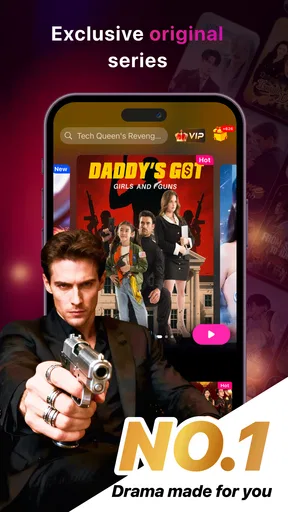
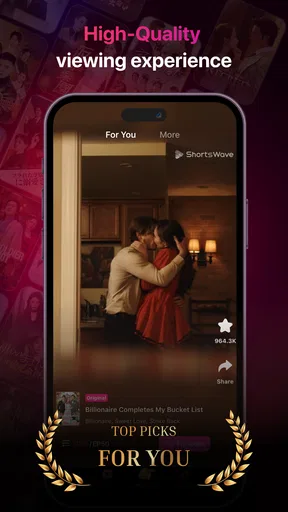
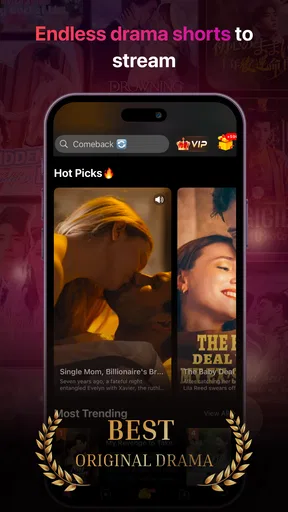
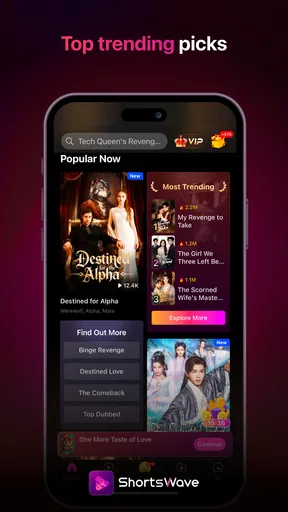
 Analysis by AppCompare
Short drama apps can be a good fit when I want a complete-feeling story in a small break, but they also ask for a different kind of attention than a conventional series. With ShortsWave: Watch Drama Series, the main appeal is the format: it focuses on drama told in short episodes, so I can sample a story without setting aside an evening. I’d approach it as a dedicated destination for quick fiction, rather than a replacement for every streaming service I already use.
What to expect from the short-episode format
ShortsWave is an entertainment app from HALOFUN PTE. LTD. Its focus on short drama makes the most sense for people who enjoy plot-driven stories but often have only a few spare minutes. The app is free to install, is rated Teen, and has an average rating of 4.6 from around 107,000 ratings. That gives a newcomer a useful sense of its audience, though ratings alone can’t tell you whether its particular storytelling style will click with you.
The difference from a standard TV service is not simply that an episode is shorter. A short-form drama is easier to try in a gap between tasks, but a tense cliffhanger can make that gap feel less restful if I keep watching “just one more.” I’d start with a story whose premise genuinely interests me and decide whether I like its pacing before making it part of my regular routine.
It has passed 1 million installs, and its Teen content rating is worth keeping in mind if you’re choosing entertainment for a younger viewer. That label is a useful starting point, not a substitute for a parent or guardian checking whether a particular story feels appropriate. The app is free, while in-app purchases range from $0.99 to $199.99 per item, so I’d pay attention to any purchase prompt and make sure I understand the cost before confirming one.
Getting started without turning it into a project
On Android, the listed minimum operating-system requirement is version 6.0, and the current version is 2.52.00. Once installed, I’d give myself a simple first goal: open the app, browse the drama selection, and pick one series based on its premise rather than trying to understand every option immediately. That keeps the first visit low-pressure and makes it easier to tell whether the format suits me.
If I’m unsure what to choose, I’d use a practical filter: decide whether I’m in the mood for romance, suspense, or something lighter, then sample a story that matches. That’s more reliable than opening whatever looks most prominent and hoping it fits the moment. I’d also check how the app presents an episode’s story and any viewing prompts before settling in, especially if I’m using it during a short break.
Finding the first satisfying watch
My best first-use scenario would be a quiet lunch break at home. I’d choose a drama that sounds appealing, watch enough to understand its characters and central conflict, and stop when I need to return to the day. The useful test isn’t whether I finish a series immediately; it’s whether the short format makes the story easy to pick up again without losing track of why I cared about it.
Worth Reading Before You Choose

EA SPORTS FC Mobile 26 Is a Bigger Football Game, but It Takes Time

Flipboard Shows What News Apps Must Do Beyond the Feed

Switching to Android Auto Means Rethinking Your Driving Routine

Google Calendar Makes a Crowded Week Easier to Manage

Ludo King Makes the Most of the Minutes Between Plans

Baby Panda World Brings Quick Play to Modern Phones, but Its Game Library Feels Busy
For a commute, I’d be more selective. Short episodes sound convenient, but watching a story while distracted by stops, announcements, or a crowded carriage can make a plot harder to follow. If I can’t give the screen much attention, I’d save the app for a calmer break instead of assuming that short means effortless background viewing.
What’s the Buzz About?
So, what exactly is ShortsWave: Watch Drama Series? Picture this: a platform dedicated solely to short drama series, perfect for those moments when you want a quick story fix without the commitment of a full-length series. I was intrigued by the concept right off the bat. The app promises a diverse range of genres—from heart-wrenching romances to nail-biting thrillers—all wrapped up in bite-sized episodes.
Interface & Usability
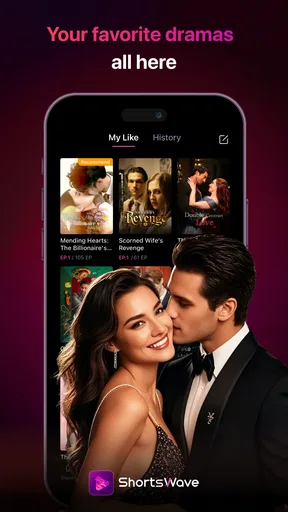
Let’s start with the first impression. The app’s interface is clean and intuitive. Navigating through the various categories is a breeze, which is a huge plus for someone like me who has a love-hate relationship with complex apps. The design is minimalistic, and the color palette is easy on the eyes, enhancing the overall user experience.
One thing I particularly loved is how the app organizes its content. You can easily browse through trending series, new releases, and even curated playlists based on your viewing history. It’s like having a personal cinema assistant right in your pocket.
My practical tip is to browse with a purpose rather than treating the home screen like an endless menu. Pick a mood, open a likely match, and give it a fair try. If a story doesn’t draw me in, I’d move on instead of assuming every series will have the same pace or appeal. That small choice makes the app feel more like a quick route to a story than another feed to scroll through.
There is a trade-off in a catalogue built around quick discovery: a prominent title or category may catch my eye, but it won’t necessarily be the best match for the time I have. For a relaxed evening, I might be willing to explore; for a short break, I’d choose a familiar genre and avoid browsing longer than I plan to watch.
Content Variety
Now, onto the real star of the show: the content. The app boasts a surprisingly vast library. Each series is crafted into short episodes, making it perfect for a quick watch during lunch breaks or commutes. I found myself getting hooked on stories I never thought I’d enjoy, simply because they were so accessible.
From intense crime dramas that keep you at the edge of your seat to light-hearted romantic series that warm your heart, the variety is impressive. The app even offers some international series, subtitles included, which gives it an edge over other streaming platforms.
Subtitles can make an international story easier to follow, but they also change how I use the app: I need to keep my eyes on the screen, so it is less suited to casual listening while I cook or walk. If I’m watching in a language I don’t understand, I’d choose a place where I can focus on both the dialogue and the action. That’s a small but useful distinction between a subtitle-led drama and a familiar show I can follow mostly by ear.
Short dramas can also be a better starting point than a long series when I’m not sure I’ll like a genre. I can test the tone and characters without committing to a full-length episode. The flip side is that a compressed story may move quickly, so someone who prefers slow character development and long scenes may find the format less satisfying even when the premise is appealing.
Compared with general streaming services, ShortsWave is more narrowly aimed at short drama rather than a broad mix of films, long-form television, and other video. That focus is helpful when I want this specific kind of story, but it is not a reason to replace a general service if I’m looking for a particular established show, a film night, or a wider range of entertainment. I’d keep it as a complementary option for quick fictional storytelling.
Streaming Quality
What’s a streaming app without good quality? Thankfully, ShortsWave delivers. The video quality is top-notch, and I experienced minimal buffering even on my less-than-stellar internet connection. You can adjust the quality settings based on your data preferences, which is a thoughtful touch.
For anyone watching on a limited mobile connection, the sensible habit is to be deliberate about when and how long to stream. A short episode may sound like a small data commitment, but several episodes can turn a brief visit into a much longer session. I’d check my connection and plan a stopping point before pressing play if I need to keep data use in check.
I’d also treat smooth playback as something that depends on the situation, not a guarantee for every network. If a scene pauses or the picture struggles, waiting for a steadier connection is more comfortable than repeatedly interrupting the story. The app’s video controls are useful when I want to adapt playback, but they don’t remove the basic trade-off between streaming convenience and a variable connection.
Community & Interaction
One of the features I didn’t expect to enjoy as much as I did is the community aspect. The app allows you to leave comments on episodes, engage in discussions, and even recommend series to other users. It’s like having a mini fan club for each series, and it adds an extra layer of fun.
I’d use episode discussion after watching rather than before. Reading other people’s reactions first can reveal how a scene lands or draw attention to a plot point, which may affect the surprise for a new viewer. If I want to keep the story’s twists intact, I’d watch first and open the conversation afterward. That turns the comments into a place to compare impressions instead of a source of accidental spoilers.
Recommendations from other viewers can help when I’ve finished a story and want a new direction, but they remain personal opinions. If someone suggests a series, I’d still check whether its genre and premise suit my mood. This is one area where ShortsWave differs from simply watching a video alone: the discussion can add context, but it also asks me to choose how much of the surrounding conversation I want.
Subscription and Pricing
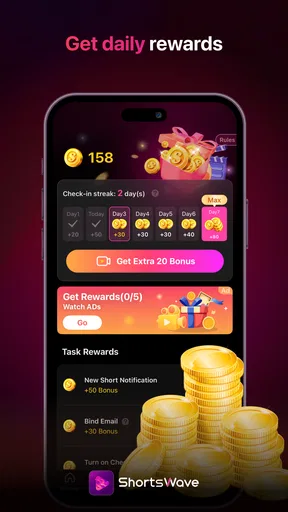
Let’s talk money. The app offers a free version with ads, which isn’t too intrusive. However, if you’re like me and can’t stand interruptions, the premium subscription is reasonably priced. It offers an ad-free experience, offline downloads, and early access to new releases. Honestly, considering the quality and variety of content available, the price seems fair.
Because in-app purchase amounts vary, I wouldn’t treat the word “free” as meaning every viewing option or purchase is included at no cost. I’d read each on-screen offer carefully, especially before tapping quickly through a prompt. A useful approach for a first-time user is to try the free experience first and decide whether any paid option solves a real problem, such as interruptions, rather than paying before knowing how often the app will be used.
If I’m mainly opening the app for occasional short breaks, a paid purchase may not be worthwhile for my habits. If I return often and a particular paid option addresses something that genuinely bothers me, I can weigh that convenience against its displayed cost. Either way, I’d make that choice based on my own viewing pattern, not on the pressure of a cliffhanger or a limited moment of excitement.
Who will get the most from it
I’d recommend ShortsWave to someone who enjoys melodramatic turns, quick plot momentum, and the feeling of being able to start a story without reserving a large block of time. It also suits a viewer who likes sampling genres and discussing episodes with other fans. A person who wants one focused drama destination on a phone may find that more convenient than searching through a broad streaming catalogue every time.
I’d be less likely to recommend it to someone who wants long, unhurried episodes, prefers a single subscription library for films and television, or needs entertainment that works mainly as audio in the background. It may also be a poor fit for viewers who find cliffhangers frustrating or who would rather not encounter purchase prompts while browsing. In those cases, a conventional long-form service, a familiar rewatch, or an audio-first option may fit better.
For a first-time viewer, my next step would be to choose one story, watch with enough attention to judge its style, and then decide whether to continue, browse another genre, or leave the app for later. That simple test answers the key question more honestly than trying to explore everything at once: does short-form drama make an ordinary spare moment feel more enjoyable?
Final Thoughts
In a world overflowing with streaming options, ShortsWave stands out by offering something unique. It’s a haven for those who love drama but don’t always have the time to commit to an hour-long episode. The app’s user-friendly design, coupled with its diverse content and community features, makes it a must-try for any drama lover.
So, if you’re looking for a convenient way to enjoy drama series without the usual time constraints, give ShortsWave a try. Who knows? You might just find your next favorite series in one of those short, captivating episodes.
Pros
- Wide variety of drama genres available.
- High-quality video streaming experience.
- User-friendly interface and easy navigation.
- Regular updates with new series added.
- Option to download episodes for offline viewing.
Cons
- Requires a subscription for full access.
- Limited content in some regions.
- Ads in the free version can be intrusive.
- No customization of subtitle settings.
- Some buffering issues on slower networks.
FAQs for ShortsWave: Watch Drama Series
What is ShortsWave: Watch Drama Series?
ShortsWave: Watch Drama Series is a streaming app that offers a curated collection of drama series, specifically designed for mobile viewing. It features a wide range of genres, including romance, thriller, and mystery, with episodes typically ranging from 5 to 15 minutes. This makes it perfect for quick entertainment on the go.
Is ShortsWave available on both Android and iOS?
Yes, ShortsWave is available for download on both Android and iOS platforms. You can find it on the Google Play Store for Android devices and the Apple App Store for iOS devices. Make sure your device meets the minimum OS requirements for optimal performance.
Does ShortsWave require a subscription?
ShortsWave offers both free and premium content. While users can access some series for free, a subscription is required to unlock the full library and enjoy ad-free streaming. The app provides various subscription plans, including monthly and annual options, to suit different budgets and preferences.
Can I download episodes for offline viewing in ShortsWave?
Yes, ShortsWave allows you to download episodes for offline viewing. This feature is especially useful for users who want to watch content without an internet connection, such as during travel. Simply select the download option on the desired episode to save it to your device.
Is parental control available on ShortsWave?
ShortsWave includes parental control features to ensure a safe viewing experience for younger audiences. Parents can set content restrictions based on age ratings and block specific series if needed. This feature helps manage what children can access, providing peace of mind for parents.


